
Navigate this guide · 1,512 words
The essential signal
- NVMe is a protocol; M.2 is a form factor; SSD is a storage-device category.
- Both SATA and NVMe M.2 drives exist, so verify the slot’s supported mode.
- PCIe generation and drive model do not establish every application’s performance.
- Follow model-specific installation guidance and plan data recovery before upgrading.
A familiar product description can hide several layers
The labels in an M.2 NVMe SSD listing describe different aspects of the drive. SSD identifies a storage-device category. M.2 describes a physical form factor. NVMe identifies a protocol for communication with non-volatile memory. NVM Express, the organization maintaining the specifications, describes NVMe across several transports and form factors. The labels are related in many consumer products, but none should be treated as a synonym for all the others.[1][2]
Separating those labels helps prevent an incompatible upgrade. A drive can have a familiar shape and still require a communication mode that the system does not support. Equally, an NVMe device need not use the particular small module that appears in a laptop advertisement. The purpose of this guide is to make the compatibility questions legible, not to rank specific products or claim a measured speed improvement. A careful check of the computer's documentation remains more important than the simplicity of a shop's category name.[1][2]
NVMe is the communication model
The NVMe specifications define communication between host software and nonvolatile memory subsystems. NVM Express separates the base specification from command-set and transport specifications. This organization is a clue to the scope: a protocol is not just a connector or a circuit board. It describes interactions and capabilities, while other documents bind that model to a transport or extend it with specific command sets.[1]
For consumer upgrades, NVMe over PCI Express is the combination many readers encounter. But NVM Express also names RDMA and TCP transports, as well as form factors such as U.2, M.2, add-in cards and EDSFF. Those broader uses explain why “NVMe means an M.2 stick” is too narrow. You do not need to master every specification to buy a laptop drive. You do need to keep the protocol, transport and physical package separate enough to read your system's requirements accurately.[1]
M.2 describes shape, not a universal storage mode
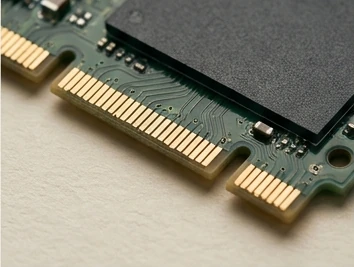
PCWorld's guide highlights an easy detail to miss: M.2 drives can use NVMe or SATA. It advises checking whether a spare M.2 slot supports NVMe, SATA or both before buying. A matching description of the physical form factor therefore does not, on its own, establish that a storage device can communicate with the machine.[2]
A short product listing can hide that distinction. An advertisement may use “M.2 SSD” as shorthand for an NVMe drive, while another uses “SATA SSD” as shorthand for a larger 2.5-inch product. Those are common product combinations, not definitions that cover every device. Read the full model specification, then compare it with the computer or motherboard's supported storage modes. If the listing is ambiguous, the useful response is to ask for the missing specification rather than infer compatibility from a photograph.[2]
The computer’s support matrix is the starting point
Start with the computer's documentation rather than assuming a newer drive type must be appropriate. Identify the supported storage interface and the physical slot or bay. PCWorld specifically recommends checking the supported protocol for an available M.2 slot. The broader NVMe specification landscape explains why this check cannot be replaced by a claim that a computer “has NVMe” without identifying which device connection is involved.[1][2]
Also record the supported module dimensions, mounting details and manufacturer installation requirements. These are questions to verify for your particular machine, not universal dimensions supplied by this article. A retailer's compatibility tool can be helpful, but retain the exact model names and confirm them against a reliable support source. Where the manual is unclear, seek a manufacturer answer before opening hardware or buying a device that cannot be returned.[1][2]
Generation names are not workload results
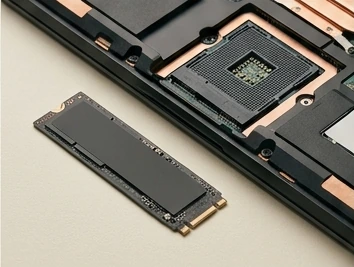
As PCWorld explains, NVMe transfer rates vary with the PCIe generation and the drive model. A protocol family or generation label is therefore not a complete benchmark. Even when a drive supports a faster interface than an older device, that does not establish the time taken by every application task on the computer. The claim needs a workload and a compatible path.[1][2]
Compatibility and a noticeable improvement in your workload are separate questions; the latter needs task-relevant evidence. A large sequential-transfer figure should not be relabeled as a guaranteed application-launch improvement. TechnoGalaxy has not benchmarked the devices illustrated here. For a purchase decision, look for credible measurements that name the model, system and task, rather than relying on a maximum figure presented without enough conditions to interpret it.[1][2]
Capacity and fit can matter more than a headline
Once the drive fits and uses a supported connection, capacity may be the more important practical choice. The protocol/form-factor distinction does not tell you which capacity, price or product support policy is appropriate. NVM Express describes a communication standard, not a certification that every consumer model is the best choice for every workload. Product-level details remain product-level questions.[1][2]
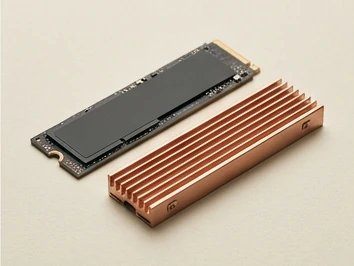
Write a purchase brief naming the computer, supported connection, required capacity and recommended installation route. Include any documented cooling or clearance requirements rather than assuming an accessory pictured with one drive will fit every system. This is an editorial planning exercise, not an instruction to alter a device's cooling design. A compatible, well-documented option that meets the capacity need can be more useful than a faster-looking model chosen without checking fit.[1][2]
Plan the move, not just the new part
Selecting compatible storage and moving a working system onto it are different tasks. The protocol documentation tells you how a device communicates; it does not decide how your files, operating system or backups should be handled. Before a storage change, consult the computer manufacturer's installation instructions and choose an appropriate migration or fresh-installation process for your situation.[1][2]
Before changing storage, make a backup that remains usable independently of the drive being replaced. Keep recovery information accessible without depending on the device being replaced. This guide does not provide a universal disassembly sequence, cloning command or encryption-key procedure. Those details vary with the system and software. Treat the illustration of an installation as contextual artwork, not an approved service manual. If you are unsure about a sealed computer or a mounting arrangement, get model-specific assistance rather than improvise.[1][2]
Read a listing as a compatibility worksheet
Separate M.2, NVMe and SSD before comparing the prices attached to those labels. SSD describes the storage device category, M.2 describes a physical form factor, and NVMe describes the communication protocol. PCWorld's explanation is helpful because it distinguishes these layers rather than treating the words as interchangeable. Write each layer on its own line in a compatibility worksheet. Then place the computer manufacturer's documented requirement alongside it. The aim is not to become an expert in every storage specification; it is to avoid a purchase in which a matching physical outline is mistaken for proof that the drive can communicate with the host.[1][2]
Use the host's service manual or support documentation for details a general buying guide cannot establish. Check the supported storage interface, the permitted module dimensions and the installation provisions for your exact model. If that information is missing, stop and ask the manufacturer or a qualified technician rather than experimenting with a connector that merely looks compatible. A generic article does not know the clearance, firmware behavior or supported configuration of your computer. This is why the worksheet should retain a source for each compatibility decision. A confident seller description is useful input, but it should not silently replace the host documentation.[1][2]
Separate an upgrade goal from a benchmark headline
NVMe defines a storage architecture, not a benchmark result for every drive using it. A sensible evaluation therefore starts by naming the workload. Are you trying to create more room for a growing library, improve the responsiveness of a particular application, or shorten a repeated transfer? Those are different goals, and a capacity upgrade can be worthwhile without being an impressive benchmark upgrade. Do not assign a promised time saving to a protocol label. A claim about a particular product needs evidence for that product and a workload that resembles the one you actually intend to run.[1][2]
Treat migration planning and performance comparison as separate pieces of work. Before changing storage, identify the data that must survive, verify an independent backup, and determine how the operating system and applications will be restored or moved. These are editorial precautions, not model-specific repair instructions. After installation under the manufacturer's guidance, check that the expected capacity is available and that the tasks you care about work correctly. Only then evaluate whether the original upgrade goal was achieved. If you publish your own comparison, record the source and destination of the transfer and the relevant configuration. Avoid presenting a single attractive number as proof of compatibility, reliability or universal everyday speed.[1][2]
A five-question buying check
Before buying, check the supported storage mode, physical package, exact drive, intended workload and data-migration plan. The first two questions follow directly from separating protocol and form factor. The remaining questions keep the shopping decision connected to an actual use case and a safe, documented process.[1][2]
Aim for an explicit compatibility statement: the host supports this connection and package, and the identified drive meets those requirements. A further performance claim needs its own evidence. Understanding the labels does not remove every purchase risk, but it prevents a common mistake: assuming that two products with the same-looking shape, or a familiar “SSD” heading, answer the same technical question. That small conceptual improvement can make the whole upgrade less confusing. Keep the exact drive model in the compatibility note so the purchase can be checked against the host documentation before installation begins.[1][2]
Questions, answered.
Is every M.2 SSD an NVMe SSD?
No. M.2 describes a form factor, and SATA M.2 drives also exist. Check the drive and slot specifications.[2]
Does NVMe always mean a small laptop module?
No. The standards cover multiple transports and form factors, including M.2, U.2, add-in cards and EDSFF.[1]
Read the sources.
- NVMe specifications and specification-set overviewNVM Express · Accessed 2026-10-13
- NVMe vs. M.2 vs. SATA SSD: what is the difference?PCWorld · Accessed 2026-10-13
AI assistance and source checks reduce risk; they do not guarantee error-free reporting. See our editorial policy.